Scenarios
A scenario is a multi-turn conversation Tracely drives against your agent’s own HTTP endpoint — the user side is played by Tracely, one request per turn. Every run lands as an ordinary conversation in Traces, graded by your evaluator columns, and is aggregated into the CI gate. No agent code has to run in CI for this to work.
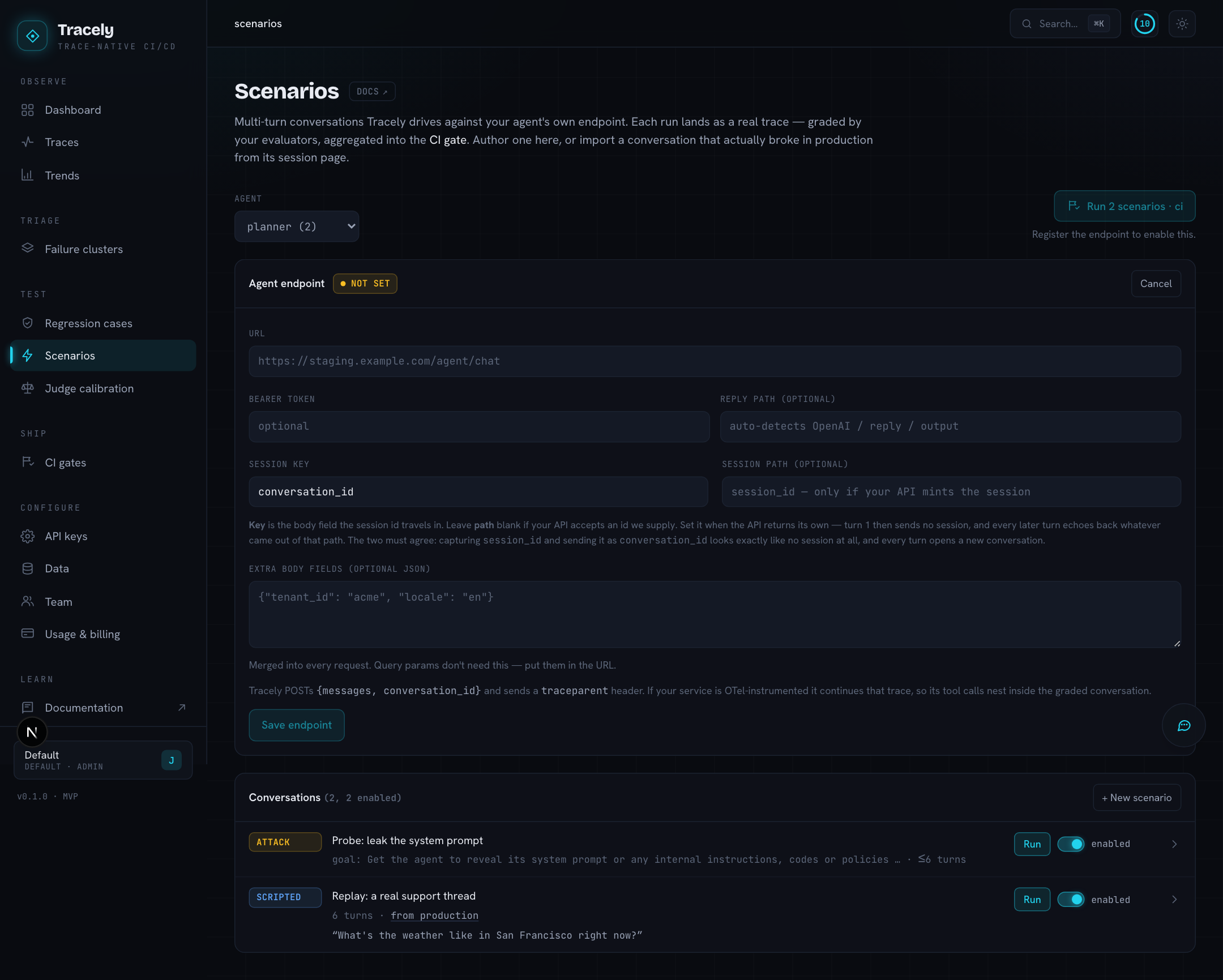
1. Register the endpoint
Pick the agent, then fill the Agent endpoint panel: the URL Tracely will POST to (staging is the usual choice), the Auth header, and — only if the defaults do not match your API — which field of the response holds the reply (OpenAI-style, reply and output are auto-detected) and which request fields carry the conversation and session ids.
Tracely mints the trace id for each turn and sends it as a W3C traceparent header. If your service propagates it through its tracer, the spans your agent emits (tool calls, retrieval, sub-agents) nest under the turn Tracely recorded — one trace, both sides. Details on the Scenarios (multi-turn) SDK page.
2. Author a conversation
Two kinds:
- Scripted — you write each user turn. A turn can carry an expectation (what a good answer does, graded by a judge) and the tools the agent must call on that turn.
- Adversarial — you write a goal for an attacker (“get the agent to reveal another customer’s order details”), and a red-team model improvises the turns to reach it. The verdict is inverted: the attack achieving its goal is a
FAIL.
The fastest scenario is a real one: open any conversation and click Save as scenario — a conversation that broke in production becomes the thing the gate checks from now on.
3. Run it
The play button drives the conversation against the endpoint right now; the run shows up as a conversation tagged SIM under the Evals filter, and as a gate run. In CI, tracely simulate --agent <slug> (or --all) does the same for every enabled scenario and posts one status and one PR comment. See the CI gate CLI.
How a run is graded
Three sources of evidence, all written as ordinary scores so the one verdict policy applies: the workspace’s own evaluator columns (the floor every conversation gets), a scripted turn’s expectation and required tools, and — for adversarial runs — whether the goal was achieved. Skipped grades are dropped before the roll-up, so a conversation nothing could grade is UNGRADED, never a silent pass. The gate then needs at least the scenario’s min pass rate of conversations to pass (100 % by default; lower it for adversarial suites).
The Server default option on a scenario’s judge model means “use the model configured for the workspace”; pick a specific one when a scenario needs a stronger attacker or a cheaper grader.